Writing Apps Should Not Be Difficult
October 10, 2025
My early history with Rapid Application Development Tools
As a teenager I played with Hypercard, Userland Frontier - with MacBird of course, and FutureBasic. Big shout out to Helix/Helix Express, which I would later have close familiarity with.
20 years later I still miss Userland Frontier. While code was stored in - to use Smalltalk terms - the Frontier image, the image also stored other data types: plain text, outline documents, dates, numbers etc. A true object database, where code was considered an object too.
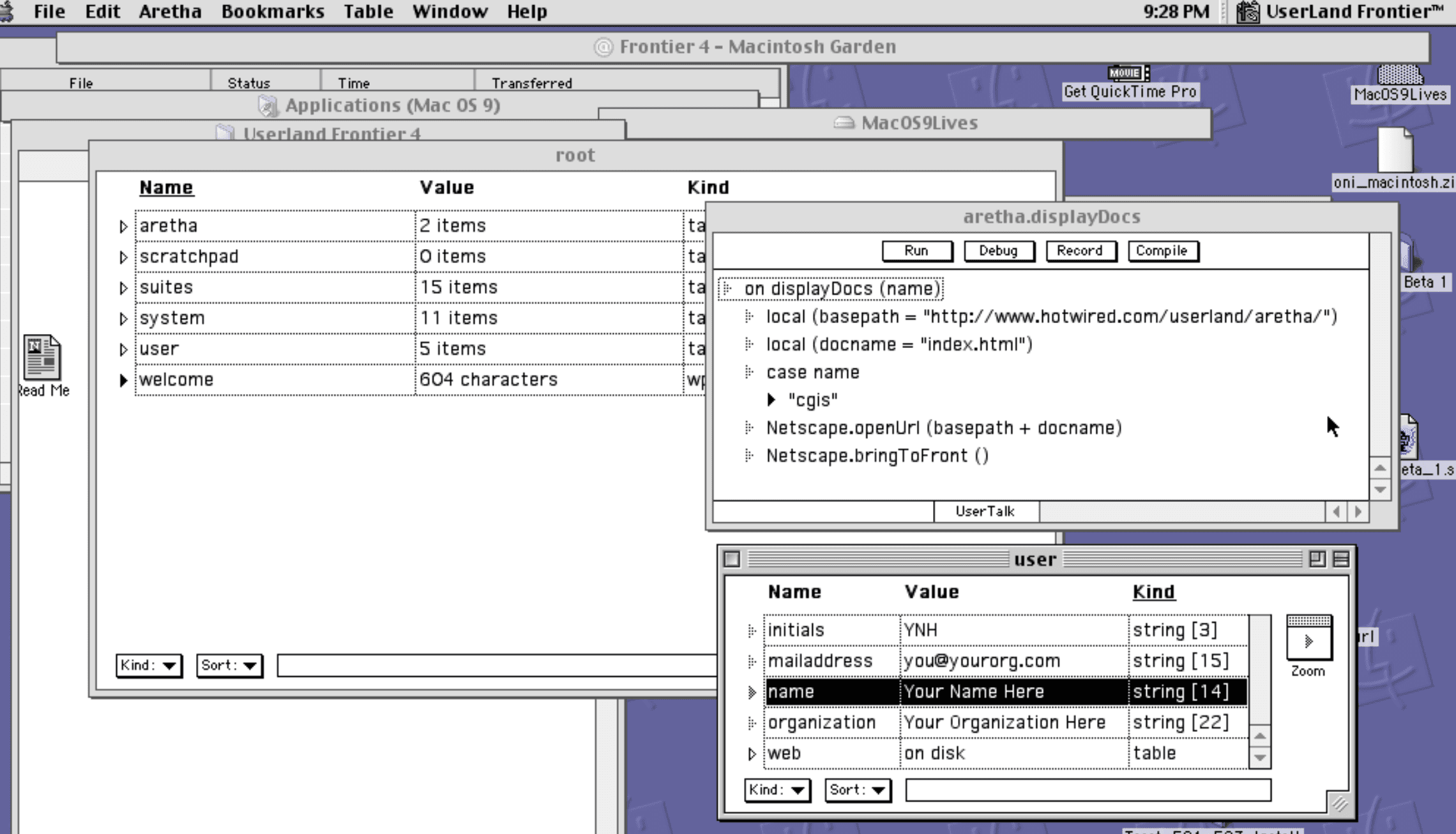
I’ve opened up two windows here: a view on the scratchpad object (with some sample stuff in there) and a view on the aretha.displayDocs function (some code).
I also enjoy Frontier’s outline based editor for code: code in a block would be indented in the outline, vs the more conventional start/end syntax blocks or significant whitespace based block delineation.
RIP (Classic) Mac OS and my tale beyond that
During, and after, college I ported software from classic Mac OS to Mac OS X. A lot of software didn’t make the transition, or did but took many years. I became interested in Cocoa desktop programming and how to create Cocoa apps faster and easier. (These were the days of Objective-C 1.0: pre Automatic-Reference-Counting, pre dot syntax). I discovered PyObjC, and would use it off and on for a handful of years.
Got sucked into the Rails community, then later the modern React based frontends: seperate, interactive frontends.
Citizen Developers
There is a mostly ignored need to make it easier for citizens to write custom solutions for themselves. Recently this was called “no-code”: (Quickbase, Smartsheet and Airtable being three notable tools. (RIP Dabble DB.) Special mention of Shortcuts too.)
I also consider Helix a “no-code” tool, although it existed before that term was invented. And Excel, also: probably the world’s most popular reactive programming language.
These tools are mostly pretty fringe, although I’m on the outside of those communities now-a-days. They’re great at building workflows on top of what they’re good at, but once you go outside that it’s very hard. You can create huge workflow systems in Quickbase, ahem ahem but I highly suggest against it.
Whatever you call it, the need for custom solutions still exist
Yesterday I wrote a silly Mac app. I want to hide part of the screen from myself (my version of Microsoft Teams no longer lets my hide my video self-view): this silly app shows a movable, resizable, floating, black, window on the screen. (Calling it iPatch, btw). Maybe it’s only for me, maybe it’s useful to put out there, I don’t know. (Drop a line if you want to try)
I spent 45 minutes making the app (60 lines of Swift code), and an hour and a half figuring out how code signing works now-a-days.
What enabled this at all was knowing I could use LLM, my rudimentary Swift knowledge, and my out of date AppKit knowledge to create an app quickly. For certain tasks LLMs reduce the level of effort required, from “The Juice Is Not Worth The Squeeze” to, “Sure, I can do that!”
LLMs also enable other citizen developers to build that app, or string together that prototype, without deep programming knowledge.
But it’s still often starting from nothing.
Productivity of Extensible Desktop Tools
In August, Brent Simmons posted a blog entry about Writing Mac and iOS Apps Shouldn’t Be So Difficult detailing his work on Userland Frontier and what kind of high level programming that enabled for people.
For me the most productive environment I’ve found, in the modern MacOS era, is Pharo Smalltalk: an environment that combines desktop affordances with an image format storing code and memory state.
I wrote a notes functionality for myself. If I had implemented such a thing traditional backend + frontend frameworks I would be fighting how to distribute it, how to run it portably, and knowing everything’s likely on the other end of a network transmission.
Pharo? I load up my code once (ever) from my Git repo, browse to it in the image, and click to open my notes window.
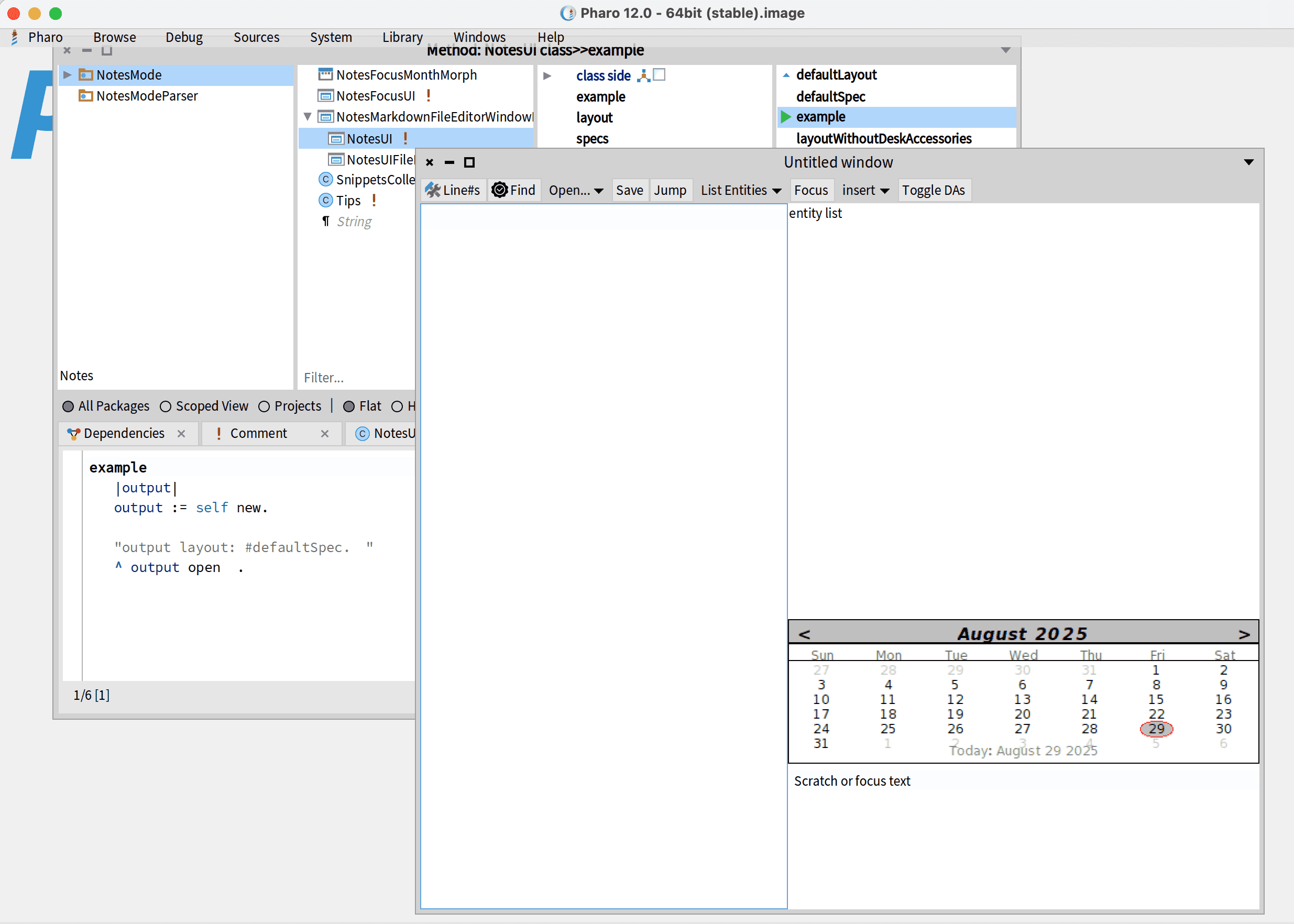
Pharo isn’t a total Frontier replacement: I miss Frontier’s data browser or word processor or outliner. (My notes mode cobbles together a “word processor” from included tools, but it’s not good).
My Goal: I write big and small programs to make my work easier and better. But unless it’s literally my job, I want to build whatever helper tool fast and get back to my real work: I don’t want to create new apps for my thing, or two different codebases (backend and frontend). In, out, quickly.
Extensible Rapid Application Development tools, like Frontier, Smalltalk or even Applescript helped me do that: build substantial tools quickly, out of big parts laying around. (See also: Emacs, a text editor with a heart of Lisp. Very honorable mention here for BBEdit, one of the premier Mac apps for implementing Applescript automation ideals.)
(Additional honorable Mention for the unix philosophy of tools joined together: although the common extension “language” is “pipe the output to something else”).
Like Applescript, I’m excited when MacOS desktop or iOS apps embrace App Intents. I hope someday for Apple Watch Siri to improve into a mobile, light weight, command station: let me deal with some emergency while I’m on a run.
These tools all offer stable platforms for end users to build on - to build upon someone else’s foundation, reducing the effort required to get my special task done.
I’ve turned OmniOutliner into both presentation software and Markdown editor, though Omnigroup’s automation abilities.
Then the web came: websites and automation
The web is too often open for creation not customization. What customization it may allow is hidden behind Tampermonkey - modify the appearance of a website on certain (but never supported) ways. Works until the site changes underneight you and breaks your script.
Sometimes the website hooks up to Zapier, but it’s pretty rare.
While most sites use APIs to communicate between the frontend of the site and the backend, mostly these are private, not public, APIs. Very few stable platforms for end users to build on.
Customization and websites
I see two problems in this area. One, the faster webapps are to write, with low maintaince costs, the less friction an app creator has, the more we may see innovation: maybe and in particular sites that do one thing well.
Second problem: how do we bring better automation - by citizens developers, not just people who speak REST, CORS, JWT and know what a terminal is - to websites? Can website designers integrate hooks in their websites, allowing easy development on the website’s foundation.
Towards the future
I’m interested in tools to reduce the time to market, and operational complexity, for new sites while being flexible for what the startup may encounter in the future. LLMs have changed the game here: enabling us to do things that were previously just not worth doing, or giving us iteration tools to use before calling in the professional programmers.
Yet, when developers are creating sites can they create extensible tools? Ways for a user to automate or make an experience better for themselves? Creating customizable apps for end users make me excited. Recreating the world just for one extra thing does not.